

You have a folder.
The data room. The client contracts with names in them. The tax return with your SSN on line 1. The unreleased spec.
You would never paste it into a chat window. So the smartest software you own has never touched the work that matters most.
AI adoption stalls at exactly one place: the folder you refuse to paste.
I know the workaround because I ran it for a year. Redact, paste, un-redact, repeat. Or skip the whole thing and read the PDFs at 11pm like it’s 2019.
Now Perplexity ships a way out.
Hybrid Compute on Perplexity Computer runs oruns one task across 2 models:
A cloud model handles search, planning, citations, and the hard reasoning
A local model on your Mac handles private files, sensitive data, and anything that touches your machine

Computer decides which model sees each step, then stitches the two halves into one answer.
Inside this Deep Dive:
▫️ The workflow everyone quit, and why the smartest agent does a third of the job
▫️ How the split works, cloud vs local vs Computer, in one diagram
▫️ Privacy Gate, the trained classifier that separates this from every privacy launch post, plus a 2-minute test to verify it yourself
▫️ Setup in 3 steps, including the one click that kills the 45-minute local-model tax
▫️ 4 workflows with copy-paste prompts: the deal room, the tax return, client contracts, unreleased product work
▫️ What it won’t do, the honest limits
▫️ Why Apple’s Private Cloud Compute is the closing argument
▫️ Your first 30 minutes, a 5-step checklist
Before you read on, 2 things.
Hardware: an Apple silicon Mac on macOS 15+, with 24GB unified memory minimum, 32GB recommended. Apple menu → About This Mac → Memory. Takes 5 seconds.
Pricing: Pro, Max, and Enterprise. The free trial covers Perplexity Computer. Hybrid Compute sits outside the free trial. Try the agent free today; the split-model mode is paid.
Qualify? Keep going. Don’t? The setup section tells you what you’re waiting for.
The workflow everyone quit
Picture an analyst with a deal room in Google Drive. 40 documents. Half of them carry the target’s name, the deal code, and numbers that would move a stock.
The public half of the diligence (comps, filings, news, market data) is what a cloud agent is brilliant at. The private half can't leave the laptop.
So she runs 2 processes. Cloud research in one window. Manual reading in the other. Copy-paste in between, stripping secrets by hand before every question.
The agent that could do the whole job does a third of it. The third that matters is still her, at midnight.
That story ends one of 2 ways. The sensitive half gets pasted somewhere it shouldn’t. Or the workflow gets abandoned.
Hybrid is built for that exact split.
How the split works
The architecture is straightforward: one task runs across 2 models, with an orchestrator in the middle deciding which one sees each step.
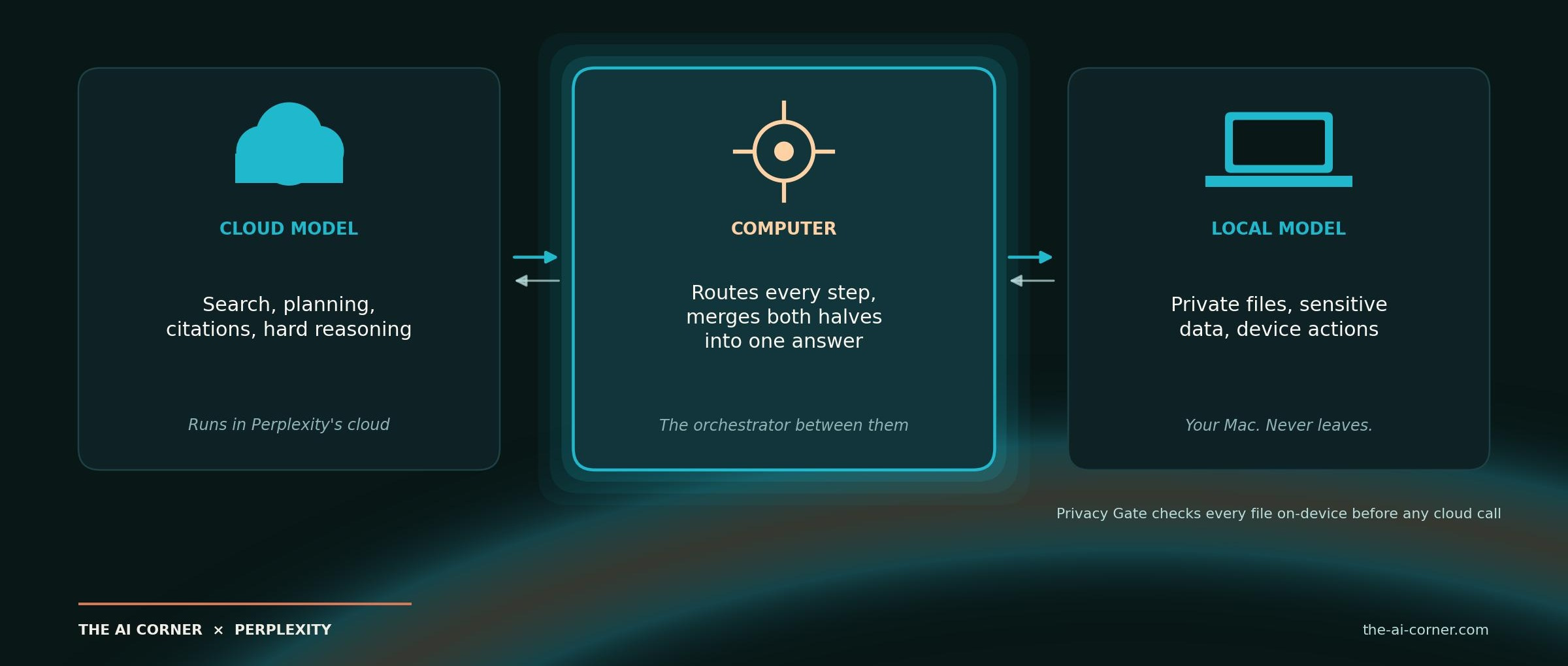
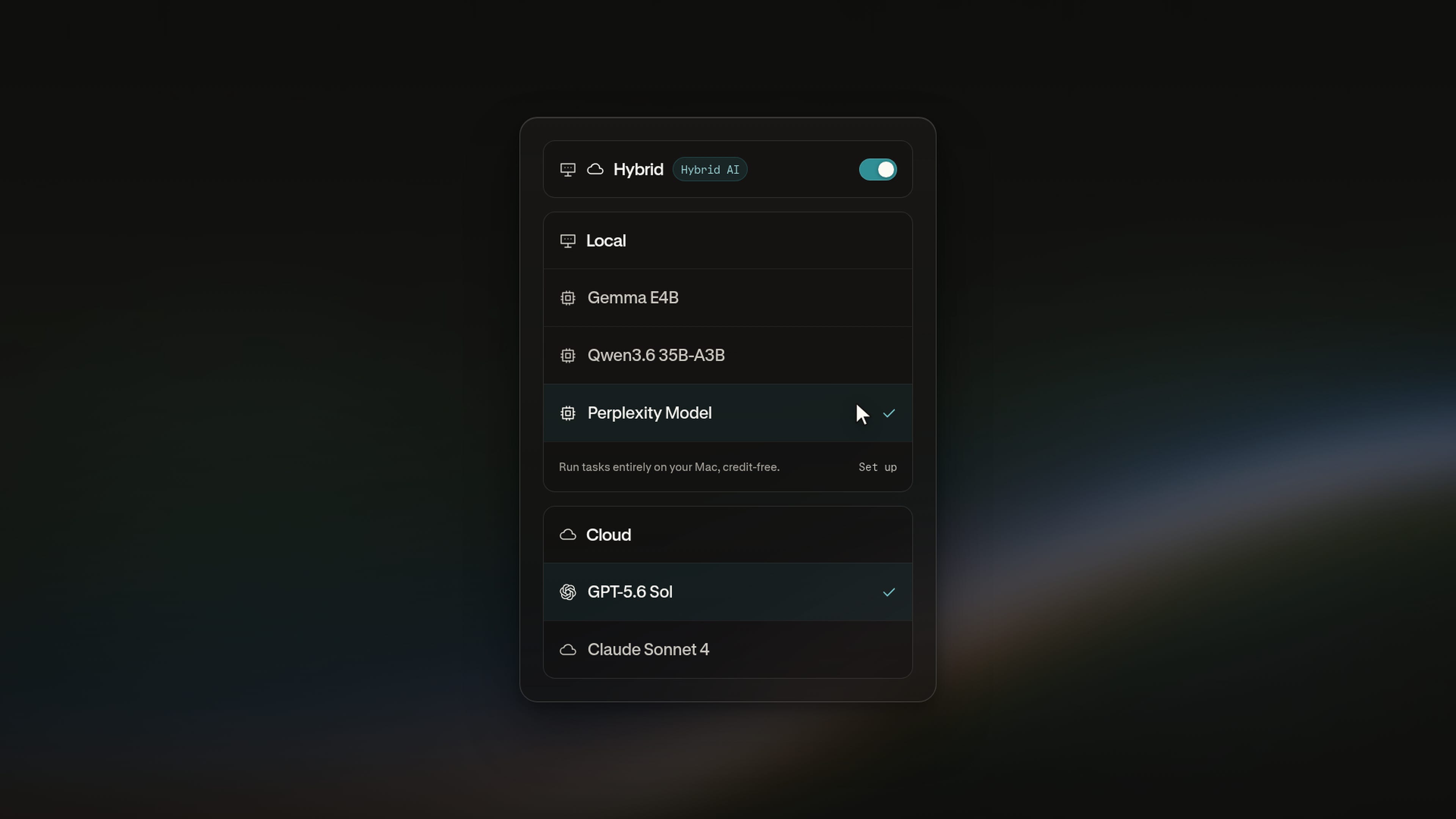
Hybrid launches with 3 local models to pick from: Gemma 4 E4B, Qwen3.6 35B-A3B, and a Perplexity post-trained model. All 3 are designed to handle the private half of an actual task.
One consequence is worth pricing in: the local half burns zero cloud credits. Work running on your Mac costs nothing per token, so the more of a task that stays on-device, the cheaper the whole thing runs. Same idea as giving an agent its own computer, except the isolated machine is the one on your desk.
The detail that separates this from every privacy launch post
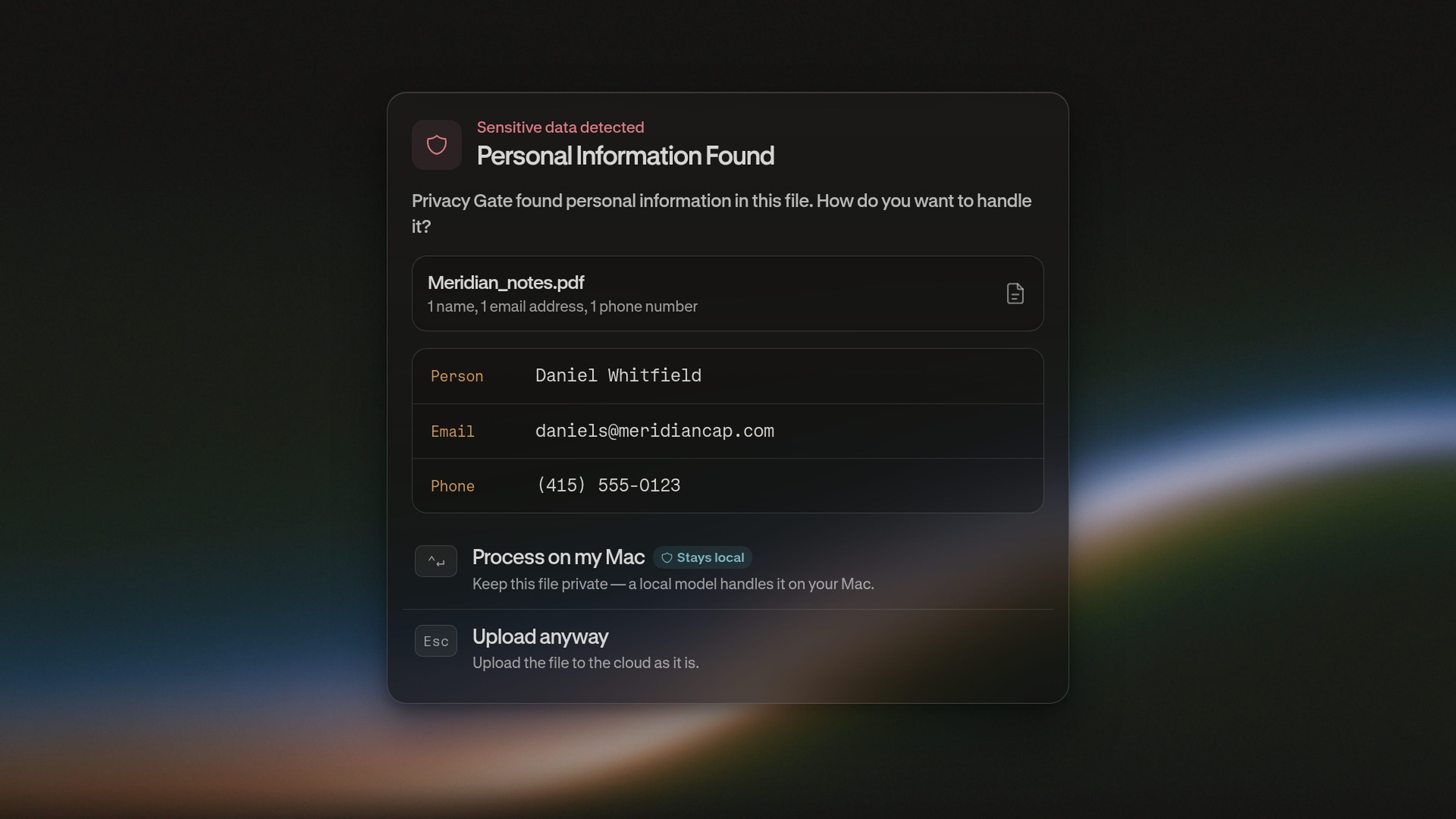
Perplexity calls it Privacy Gate: a PII classifier that runs on the Mac before any cloud call.
This is the part worth reading twice.
Most products do this with a regex. Match something shaped like a card number, block it, hope. Perplexity’s classifier, PII-Tracer, is a trained model with a published paper behind it. The PII-TRACE benchmark and the model itself are slated for release.
So the method is documented today, while the benchmark that would let you test it independently is still coming.
The flow:
You hand Computer a task that touches a file or a block of text.
Privacy Gate scans it on-device and catches anything sensitive: names, identifiers, account details.
Then it picks the right move per item. This is the part most launches skip: it can mask the value- swap it for a stand-in, send the sanitised version to the cloud, then restore the original when the answer comes back. It can also keep it local, refuse, or ask you.
Computer runs the sensitive steps locally, the public steps in the cloud, and merges the result.
The masking is the part I find most interesting. The cloud model can reason over the structure of your document without ever holding the underlying value.
For the deal room and the law firm: admin controls
If you are evaluating this for a team rather than yourself, the relevant part is that enterprise admins set the rules org-wide. What stays local, what gets masked, and what needs human approval can be set across the org instead of left to each person's judgment in the moment. Audit logs sit behind those decisions.
For an analyst, that's a useful control. For a compliance team, it's probably the first question your general counsel will ask.
Watch the gate work. 2 minutes.
Paste a paragraph with 3 things:
▫️ A fake SSN (the SSA never issues numbers starting 000, so it’s safe)
▫️ A made-up account number
▫️ A fictional client name
Ask a question about it and watch what Privacy Gate does with each.
The classifier reads context before it decides. A card-number-shaped string can get strict treatment, while a fictional name in an innocent sentence may be judged to be exactly that: fiction.
A regex can match a shape. It can’t read the situation.
The decision about what leaves your machine is made on your hardware, before a single packet goes out.
Setup in 3 steps
A few minutes if your Mac qualifies.
Install Perplexity for Mac. Apple silicon, macOS 15+, 24GB+ (32GB recommended), on Pro, Max, or Enterprise.
Download a local model. Gemma 4 E4B, Qwen3.6 35B-A3B, or Perplexity’s post-trained model, one click inside the app. Zero Ollama, zero LM Studio, zero manual quantization.
Open the model selector, pick Hybrid. Choose the local and cloud models for the task. Computer handles the rest.
Step 2 is the one that kept local models a hobbyist thing until now. The friction was never the model. It was the 45 minutes before you could ask it anything.
One more setup worth knowing: you can fire a task from your iPhone while the Mac at home runs the local half. Point it at an always-on Mac mini and you have a private agent that works whether or not you are at the desk.
Want to learn the agent before you pay for the split?
4 workflows, with the prompt for each
I picked the 4 closest to what you actually do. Each comes with a prompt built for that specific job. Fill in the brackets and run it.
1. The deal room
Cloud: public filings, comps, competitor news, market data.
Local: the M&A docs and anything with material non-public information, deal-identifying terms kept off every cloud query.
Connectors: Drive ingests the data room locally. Gmail surfaces banker email without it leaving the device.
“Act as the associate running first-pass diligence on this deal. Everything in [DATA ROOM FOLDER] is confidential: the target name, the deal code, and every figure inside stay on this machine, no exceptions. Work in 3 passes. First, read the local documents and build me the target’s operating picture: revenue quality, customer concentration, covenant headroom, and anything that contradicts the CIM. Second, go to the cloud and pull public filings, recent news, and current multiples for the 5 closest comparables in [SECTOR], using only generic sector language in those queries. Third, put the two together and tell me where the target sits against the comps, the 5 risks I should be worried about, and the questions I put to management on Thursday. Mark every figure that came from the local files.”
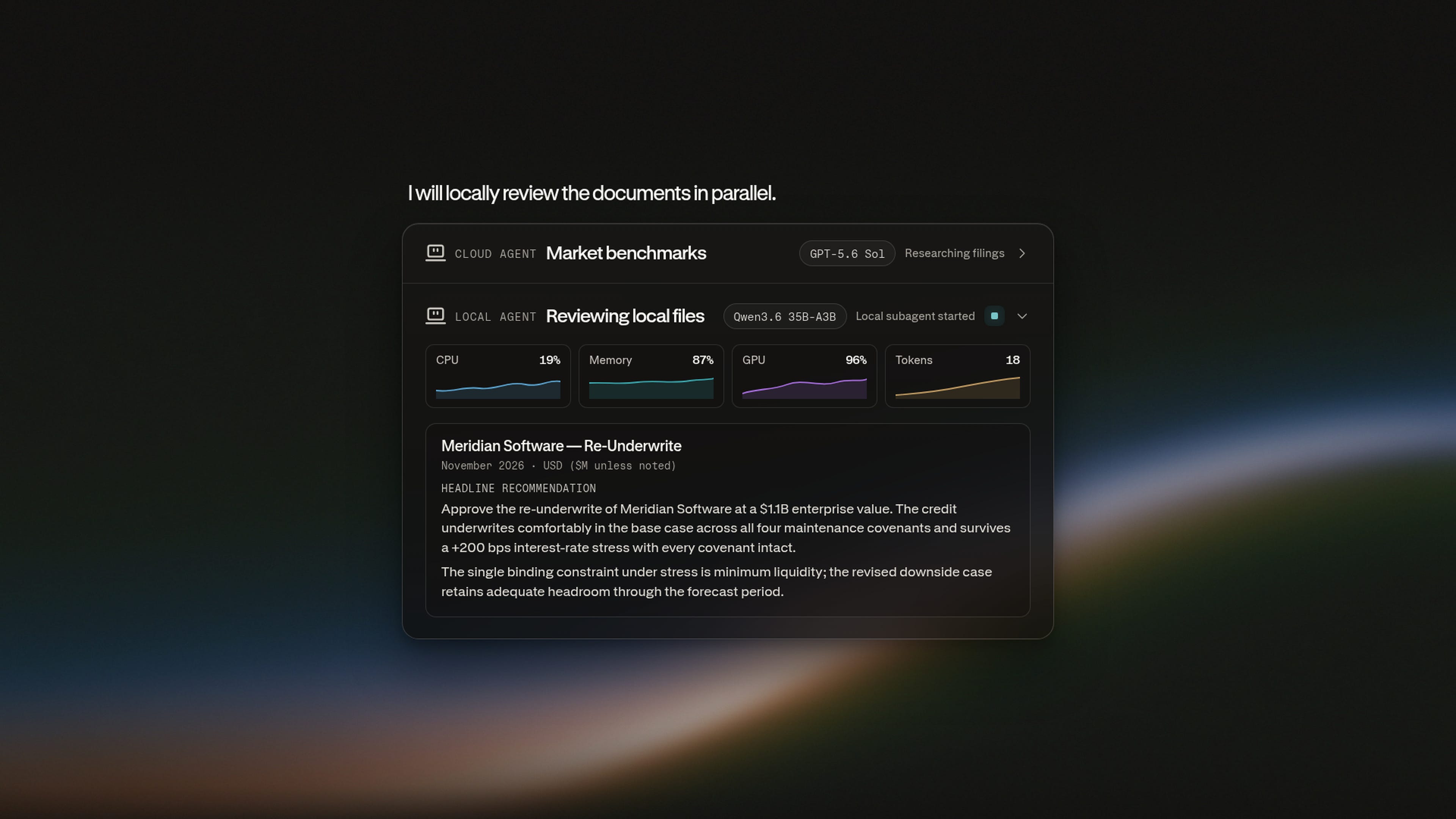
You end up with one memo built from both halves, while the confidential material stays on the laptop.. Pair it with the diligence checklist and the M&A toolkit and the agent is doing the midnight reading instead of you.
2. The tax return
Cloud: deduction eligibility, bracket rules, deadlines, all the public stuff that changes yearly.
Local: the actual return, filled from your salary, SSN, and account details.
The catch: Privacy Gate stops the SSN before the deduction question ever leaves the machine.
“I am filing my [YEAR] return and my documents are in [FOLDER]. Before you touch anything: my SSN, my salary numbers, and my account details never leave this Mac. Start by looking up what changed this year for someone filing [STATUS] in [STATE]: bracket thresholds, the rules on [DEDUCTIONS YOU ARE CONSIDERING], and the deadlines I need on my calendar. Now open my documents locally and tell me which of those rules actually apply to my situation, what I qualify for that I probably do not know about, and where my paperwork looks thin or inconsistent. Then draft the return. If any rule you found conflicts with what my documents show, stop and ask me rather than guessing.”
This may be the most relatable version of the split. Everyone knows the specific dread of typing an SSN into a text box.
3. Client contracts
Cloud: market rates, clause benchmarks, what’s standard in the jurisdiction.
Local: the actual contracts, read, extracted, compared. Client names never leave the folder.
“Using Hybrid: [FOLDER] holds my client agreements for [YEAR]. Keep client names, fees, and contract text local. From the cloud, research current market rates for [SERVICE] in [JURISDICTION], standard liability caps, payment terms, and IP clauses. Then build a table of every contract against that benchmark: where I’m underpriced, which clauses expose me, and which 3 contracts to renegotiate first, with the argument for each.”
If you run the one-person business model, this was always the workflow stuck at half-automated. The half with the names in it was off-limits.
4. Unreleased product work
Cloud: competitors, vendors, market trends.
Local: the code, the spec, the draft, compared against what the cloud gathered. Project names, asset identifiers, the actual IP: off every cloud query.
"One question: are we about to ship something the market already has? [FOLDER] holds our unreleased [PRODUCT] spec and the codebase, and none of it, the name, the architecture, the roadmap, goes anywhere near a cloud query. Read it locally first so you know what we are actually building. Then research publicly what [COMPETITOR A], [COMPETITOR B], and the 3 next closest players shipped in the last 6 months, how they price it, and what their users complain about. Come back with 3 things: the capability where we are ahead and should lead the launch with, the place we are behind and nobody will forgive, and the smallest change to the spec that would close it. Cite the spec section for each and tell me if the answer is that we are late."
This is the one for anyone who built a private context stack and hit the wall where the context that mattered most was the context they could never send anywhere.
Those 4 prompts run on Computer today:
To run them in Hybrid mode, with the local model handling the sensitive half, you'll need Pro, Max, or Enterprise.
Where it falls short
▫️ Hybrid is Mac-first: Apple silicon, macOS 15+, 24GB minimum, 32GB recommended. A 16GB MacBook Air falls short, and Intel Macs are out. Linux builders already have a Perplexity local agent (Portable Computer, on DGX Spark), and Windows lands in September.
▫️ The local models are smaller than the cloud model. All 3 launch options are capable, but they're still lighter than a frontier model. Design your prompts so the heavy reasoning runs on public context and the local side does extraction, filling, and comparison.
▫️ Hybrid is paid. The free trial is Perplexity Computer. For the split, budget for Pro at minimum.
▫️ You confirm the local-only call. Privacy Gate proposes the handling, you approve it. One extra click per flagged file.
Who is making this bet
The company shipping Hybrid Compute is running at $750 million in annualized revenue, per Sacra's estimates, up from $232 million at the end of 2025.
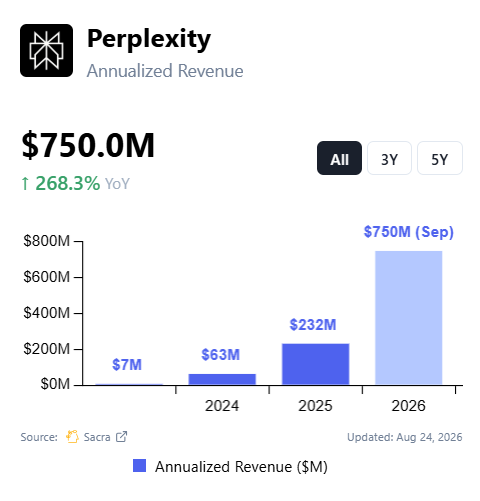
A hybrid architecture is more expensive to build and slower to ship than a pure cloud agent. The fastest-growing player in AI search chose to build it anyway.
I read that as a bet on where the enterprise money is heading: toward the folders nobody will upload.
Why the Apple comparison closes the argument
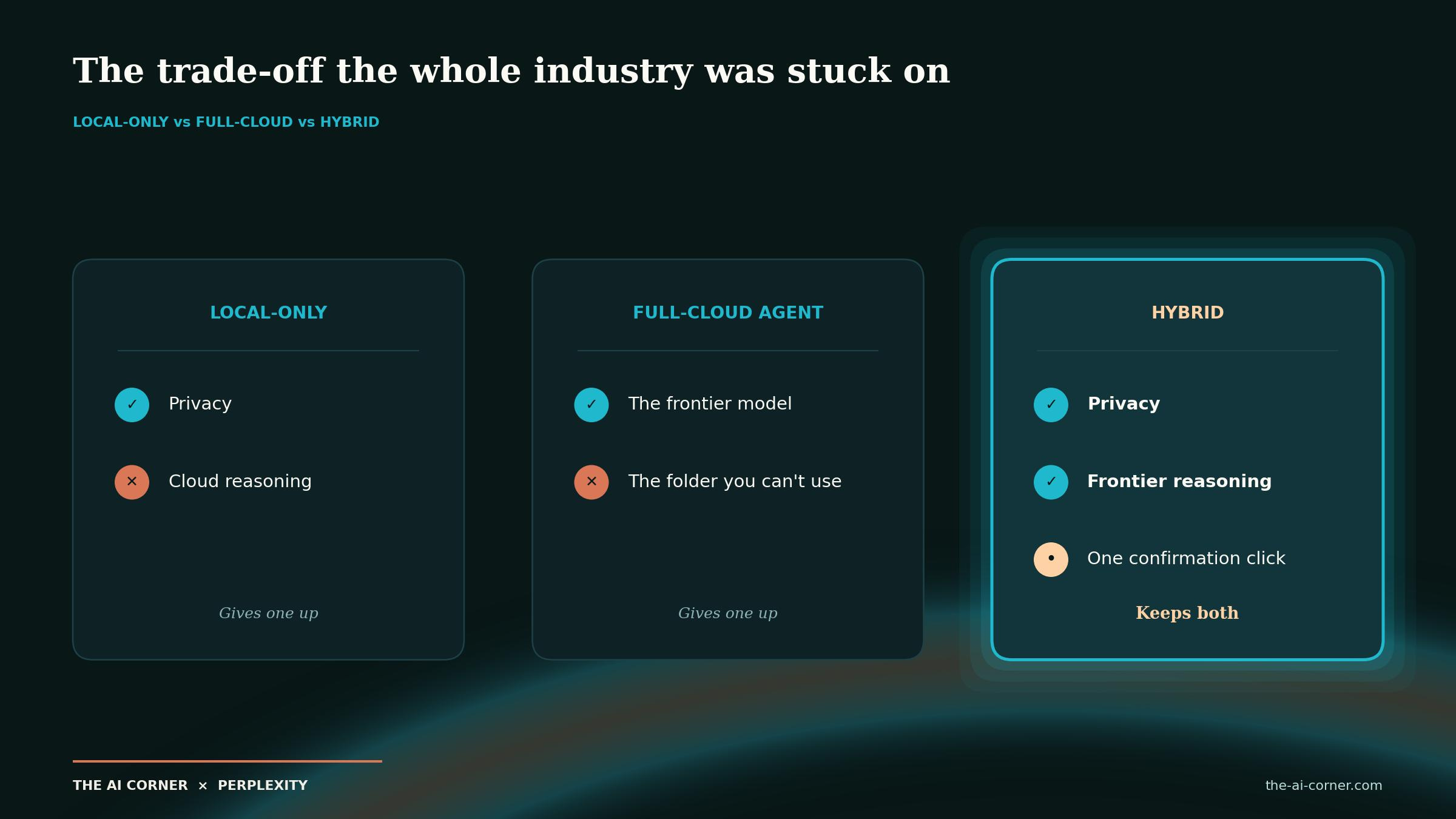
Apple made hybrid respectable. Private Cloud Compute set the pattern: do what you can on-device, escalate what you must to a cloud you can verify, and make the boundary explicit.
Hybrid Compute applies that pattern to a harder problem.
Apple’s version handles single prompts. Perplexity handles agentic tasks that read files and take multi-step actions, where the agent opens your documents, extracts from them, and ships artefacts.
That’s why the launch interests me.
Privacy pitches usually ask you to accept a weaker tool for safer handling. This one gives the agent access to the folder you had been keeping away from it.
The result is a different set of tasks you can delegate on a Tuesday afternoon.
Your first 30 minutes
Check your Mac. Apple silicon, macOS 15+, 24GB+ (32GB is better), or stop here.
Install Perplexity for Mac, download a local model, switch to Hybrid.
Run the fake-SSN exercise. Watch how Privacy Gate handles each of the 3 items.
Pick the workflow closest to your week. Paste the prompt. Point it at the actual folder.
Read the output for the seam. If you can’t find it, it worked.
Try it today
The free trial covers Perplexity Computer. Hybrid Compute is outside the free trial, on Pro, Max, and Enterprise, with an Apple silicon Mac (macOS 15+) and 24GB+ of memory; 32GB is recommended.
Start with the free trial to learn the agent. Switch on Hybrid when your folder is ready.
TL;DR
Hybrid Compute on Perplexity Computer runs one task across 2 models: a cloud model for search, planning, citations, and hard reasoning, and a local model on your Mac (Gemma 4 E4B, Qwen3.6 35B-A3B, or a Perplexity post-trained model) for private files, sensitive data, and device actions. Computer merges the two into one output.
Privacy Gate, built on the PII-Tracer classifier with a published paper, runs on-device before any cloud call. It can mask a value and restore it later, keep it local, refuse, or ask. Credentials, card numbers, and government IDs get the strictest handling. The PII-TRACE benchmark and model are slated for release.
Setup takes 3 steps: download a local model, select Hybrid, and choose the local and cloud models. You need an Apple silicon Mac running macOS 15+, with 24GB minimum and 32GB recommended, on Pro, Max, or Enterprise.
The point is the private-data boundary. Deal rooms, tax returns, client contracts, and unreleased product work can now be split between local and cloud processing. The local half burns zero cloud credits, tasks can be triggered from an iPhone while an always-on Mac runs the local side, and enterprise admins can set org-wide rules with audit logs.
The limits: Hybrid is Mac-first, the local models are lighter than the cloud ones, and Hybrid is paid. The free trial covers Perplexity Computer; Hybrid Compute is a paid feature.
Keep reading
▫️ Give your agent its own computer
▫️ Build a private context stack with Granola and Claude
The privacy split solves the reason people refuse to paste, and leaves the reason they should not trust the output untouched. I built a forensic extraction pipeline for ASX annual reports, and the hard part was never getting text out of the PDF. It was proving the numbers that came out agree with each other: total assets against liabilities plus equity, closing cash on the cash flow against cash on the balance sheet, retained earnings rolling forward. A local model reading a data room gives you the same confident summary the cloud one would, carrying the same silent risk that a figure came off the wrong column. For anything with a balance sheet in it, the pattern that actually works is extract locally, then run arithmetic gates over the extraction before a human reads a word of it. Confidentiality and correctness are separate problems and only one of them just moved.
Localizing the reasoning process while keeping the data footprint small is the logical evolution for privacy-conscious security operations. Moving the compute to the edge removes the latency of cloud-based analysis for sensitive telemetry. This architecture mirrors the shift toward distributed security models where the jurisdiction of the data remains fixed even as the analysis happens everywhere. By anchoring the logic locally, we gain control over the audit trail without sacrificing the speed needed for modern detection. It is a necessary step to decouple operational efficiency from the inherent risks of centralized processing.
https://cyrilsimonnet.substack.com/p/the-slowdown-has-a-jurisdiction-the?utm_source=substor&utm_medium=substack&utm_campaign=comment