

Here is something worth understanding about how ChatGPT and Claude actually work.

Every session starts fresh. The tool carries zero memory of who you are, what you are building, or how you like to communicate. It defaults to something generic, and you spend time reshaping the output before it is usable. Then the next session begins, and the whole cycle repeats.
The people getting genuinely different results built a system around the tool once and have been collecting the returns every day since.
“The gap between a basic user and a power user is not intelligence or technical skill. It is knowing which features exist and how to activate them.”
Both ChatGPT and Claude have features that the vast majority of users never discover:
Projects: persistent workspaces where context accumulates across every session
Memory: cross-session recall that stops you repeating yourself in every new chat
Custom Instructions: rules that run automatically before every conversation
Cowork: direct access to your local files, without a single upload
Skills and Plugins: reusable instruction packs that trigger when the context matches
Connectors: live access to Slack, Drive, Notion, Gmail, and 50+ other tools
Scheduled tasks: recurring workflows that execute while you are offline
Together, these features turn a chatbot into something that feels like a colleague who has been working with you for months, one who already knows your priorities, your voice, and your current projects before you type a single word.
This article covers the complete setup for both tools.

What the numbers actually show:
Over 900 million weekly ChatGPT users, and the vast majority rely on the free version, which lacks advanced reasoning and planning. The thinking model available through subscription is tied for first in performance benchmarks. The free version ranks 25th.
The parallel for Claude is identical:
Browser-tab Claude delivers roughly 20% of what the tool can do
Cowork on the desktop app is where the other 80% lives
The setup is the variable that changes everything, not the prompts
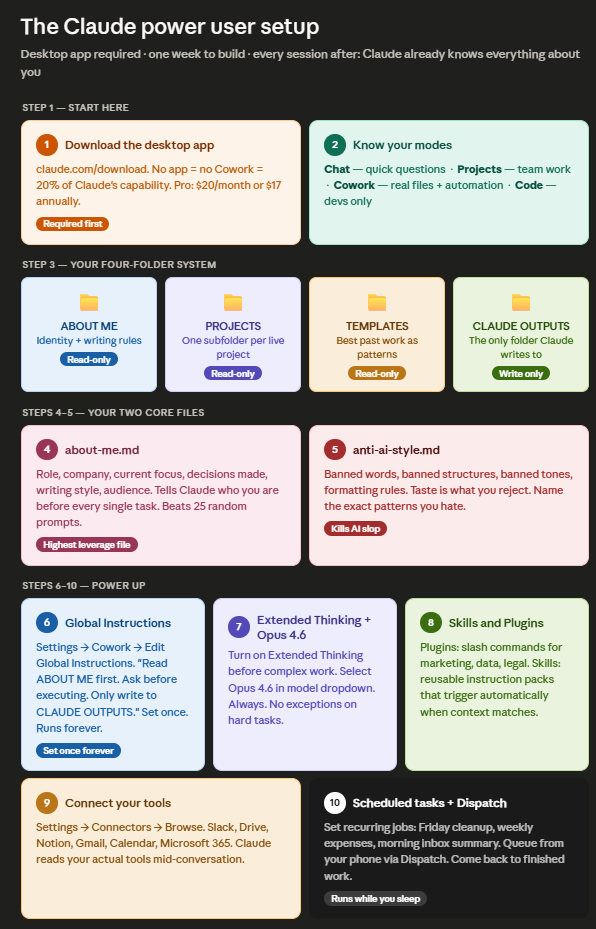

Dramatically better results from both tools are available without changing a single prompt. You just have to set them up properly first.
What is inside the full guide:
Custom Instructions templates you can copy today
Memory setup that stops you re-explaining yourself in every chat
Projects structure with dedicated instructions and uploaded reference files
Canvas walkthrough for iterative document editing
Custom GPT builder guide: your voice, your rules, shareable with your team
The self-critique prompt that forces GPT to grade and rewrite its own output
The four-folder Cowork structure that loads your full context automatically
The two core files —
about-me.mdandanti-ai-style.md— that replace 50 promptsGlobal Instructions that run before every single session, forever
Skills, Plugins, and Connectors setup
Dispatch: how to queue tasks from your phone while your computer does the work
The scheduled task setup that runs overnight without you
Plus:
A side-by-side breakdown of when to use each tool for each job
The one prompt that works identically in both ChatGPT and Claude
The correction method when output is wrong without rewriting your prompt
A full Q&A covering the questions readers ask most about both tools
Everything in one place. Immediately actionable.
Cancel anytime. First subscribers get 50% off forever.