The Claude Code team just published how loops actually work. Here is the mental model free, and the 12 ready-to-run loop recipes that hand your busywork to an agent
“I don’t prompt Claude anymore. I have loops running that prompt Claude and figuring out what to do. My job is to write loops.”
That is Boris Cherny, and the numbers behind the shift are public now. Bun’s team used agent loops to rewrite roughly 750,000 lines from Zig to Rust in 11 days, with 99.8% of tests passing. Stripe compressed a migration inside a 50-million-line codebase into a single day. One dev shipped a $50K contract for $297 in tokens.
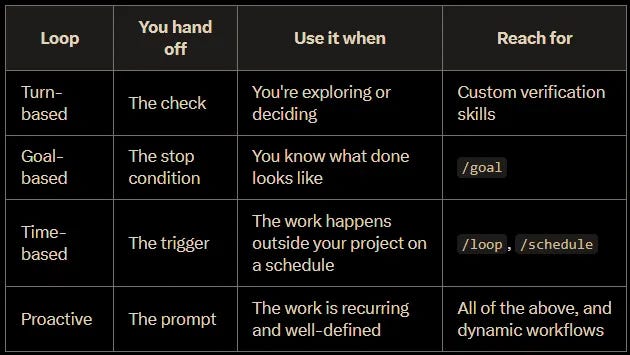
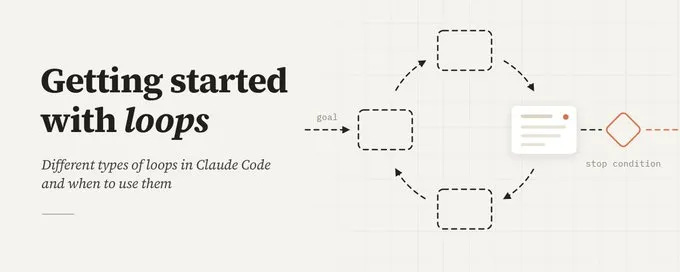
A loop is an agent repeating cycles of work until a stop condition is met. The skill is picking the right one, and the Claude Code team defines four:
The four Claude Code loops in one screen: each rung hands the agent one more piece of your job.
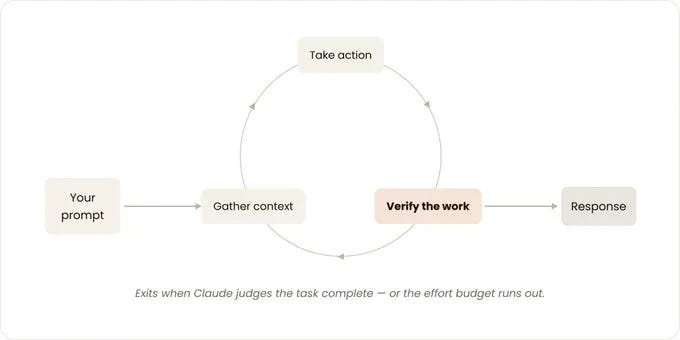
Turn-based. You prompt, Claude works, you check. Every session you already run. You hand off the check by encoding verification as a skill.
The loop you already run: prompt in, verify, respond. Encode the verification as a skill and the loop starts closing itself.
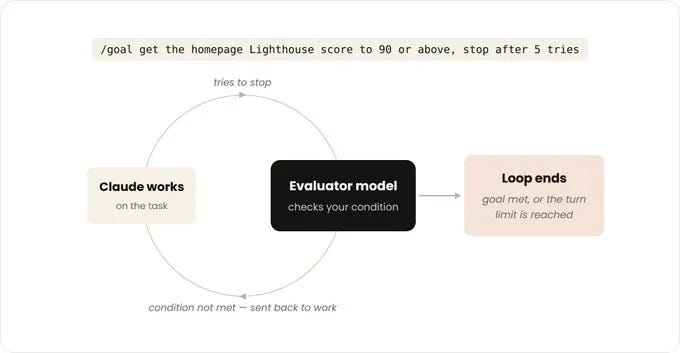
Goal-based (/goal). You define done, and a second model judges every attempt to stop. You hand off the stop condition.
The /goal trick: the agent that works stays separate from the agent that decides it is done.
Time-based (/loop, /schedule). The prompt reruns on an interval, locally or in the cloud. You hand off the trigger.
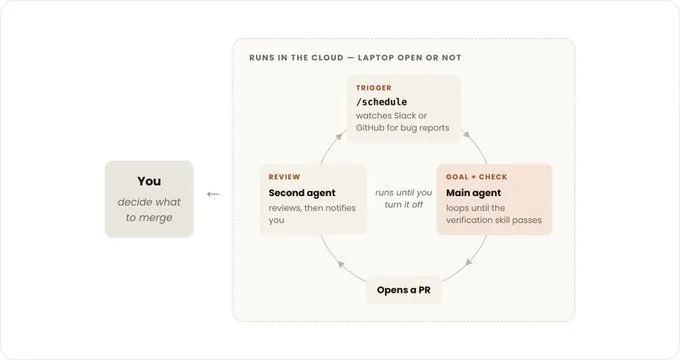
Proactive. Schedule + goal + parallel workflows, running with zero humans in the loop. You hand off the prompt itself.
The full proactive stack: /schedule triggers it, /goal keeps it honest, a second agent reviews, and your only job is the merge.
Read that list again as a ladder. Each rung hands the agent one more piece of your job, and most people stay parked on rung one.
That mental model is yours free. The gap between knowing it and running it is the exact commands, the verification skills, the stop conditions that resist gaming, and the cost guardrails, because the same primitives that shipped Bun’s rewrite have burned teams for $47,000 when left alone.
Behind the paywall:
A loop in one picture: a goal goes in, the agent cycles, and a stop condition decides when it ends.
▫️ The 12 loop recipes, exact copy-paste commands for engineering and non-engineering work
▫️ The /goal evaluator mechanic, why a second model judges “done” and how to write conditions it can verify
▫️ The verification skill template, the single change Boris says 2-3x’s output quality
▫️ The cost math, what a loop beat costs, the $1,000-a-month cadence trap, and the model-routing lever
▫️ The guardrail checklist, turn caps, circuit breakers, and the blowup stories behind each rule
▫️ The failure-mode file, reward hacking, agentic laziness, and the Dumb Zone
▫️ The decision table, which loop for which job, on one screen
▫️ The escalation path, from your first /goal to a proactive loop that runs while you sleep
One subscription unlocks every system
This is one build in a growing library. Premium opens all of them: