

Spreadsheets run the world.
Revenue forecasts that determine hiring plans. Pricing models that set your next three quarters. Runway calculations that decide whether you raise now or in six months. Board decks that convince investors you understand your business.
The most consequential decisions inside companies happen in Excel, and Excel has always had one fundamental problem: it’s powerful but completely opaque.
You open a model with 47 tabs, nested formulas across sheets, and assumptions buried three layers deep. You spend two hours figuring out what drives what. Touch the wrong cell and everything breaks. Ask the analyst who built it and they left three months ago.
This week, Anthropic shipped something that changes that reality: Claude in Excel.
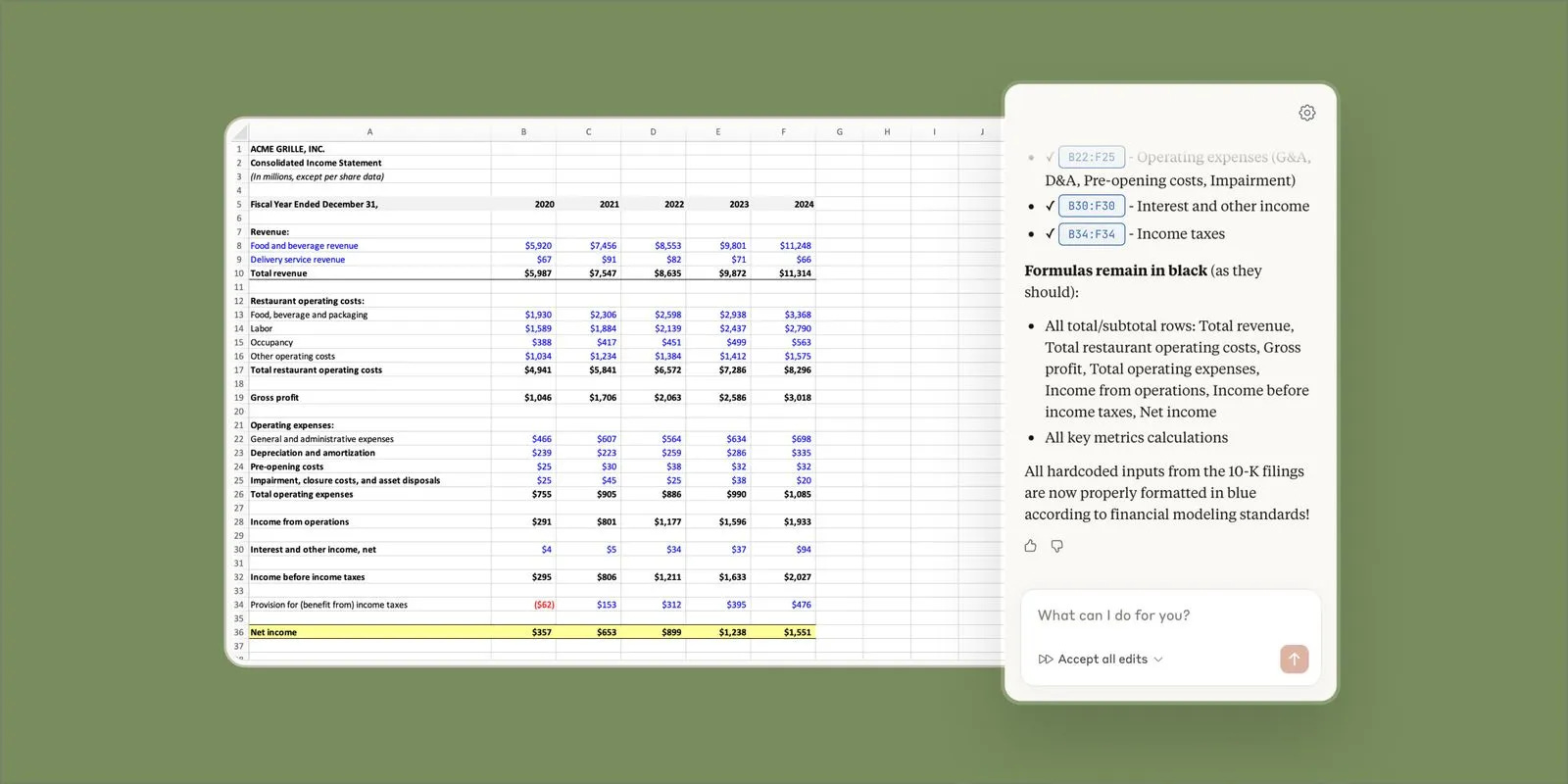
Claude runs inside Excel, reasons over your entire workbook as a connected system, and can explain exactly how every number got there.
For the first time, spreadsheets can explain themselves.
What Claude in Excel Actually Does
Claude in Excel is a native Excel add-in, currently in beta, available to Claude Pro, Team, and Enterprise users.
Once installed, Claude can:
Read your entire workbook, not just isolated cells
Understand nested formulas and cross-sheet dependencies
Explain calculations with cell-level citations
Update assumptions while preserving formulas
Debug errors by tracing them to their source
Build or populate models without breaking formatting
You open it with a keyboard shortcut, ask questions in natural language, and Claude points directly to the cells that matter.
Example: “Why did Q3 revenue drop?”
Claude: “Q3 revenue decreased because customer acquisition in Inputs!D7 dropped from 150 to 120 customers, which flows through Forecast!B14 and reduces Summary!C22 by $180K.”
It shows its work. Every answer includes the cell references that drive it.
Why AI and Excel Never Really Worked Before
We’ve had “AI for Excel” features for years. Most failed for predictable reasons:
They operated cell by cell. They’d help you write one formula but couldn’t explain how it connected to the rest of the model.
They broke things. Auto-generated formulas overwrote your logic or introduced circular references.
They optimized for automation, not understanding. “Let AI build your model” sounded great until you needed to explain it to your board.
They couldn’t explain changes. Vague observations like “your revenue forecast is different” instead of showing which assumption changed and how it propagated.
Spreadsheets aren’t documents. They’re graphs of logic where every cell can depend on dozens of others across multiple sheets.
Claude’s advantage is reasoning over structure. Claude builds a mental model of how your spreadsheet works as a system, then interacts with it the way a careful analyst would.
Three Things That Make This Different
1. Explanations you can actually trust
Every answer includes cell-level citations.
Not vague summaries, but specific paths: “Revenue growth in Q3 comes from Inputs!D7 (customer acquisition), multiplied by Pricing!B3 (ARPA), flowing through Forecast!B14, which rolls into Summary!C22.”
This matters when:
Presenting to investors and someone asks where a number comes from
Inheriting a model from someone who left the company
Auditing a deal and verifying assumptions without spending hours tracing formulas
Claude shows its work. That builds trust and makes models auditable.
2. Scenario testing without breaking anything
One of the biggest anxieties with Excel is touching assumptions and accidentally destroying the model.
Claude can:
Change assumptions globally across the entire workbook
Preserve all formulas and dependencies
Highlight every change it made
Explain the downstream impact step by step
Example: “Increase monthly churn from 5% to 7% and show the impact on Year 3 revenue.”
Claude: “Year 3 revenue decreased from $8.2M to $7.1M because higher churn reduced the customer base by 340 customers, flowing through Forecast!C45 and impacting MRR by $85K per month.”
Scenario analysis becomes conversational instead of risky.
3. Real debugging, not guesswork
Excel errors like #VALUE!, #REF!, or circular references usually mean 30 minutes of manual formula tracing.
Claude can:
Trace the error to its origin across multiple sheets
Explain exactly what went wrong
Suggest a fix that won’t cause cascading damage
Example: “Why is NPV showing #VALUE! in cell G145?”
Claude: “Cell G145 references DCF!B23, which expects a number but is receiving text from Inputs!F8 where the discount rate is formatted as ‘10%’ instead of 0.10.”
Debugging code with stack traces instead of spreadsheet archaeology.
Who This Is Actually Useful For
1. Founders stress-testing financial models
You built a model six months ago. Now you need to see what happens if you miss revenue by 20% or delay hiring. The anxiety: touch the wrong cell and break everything before your board meeting.
Claude lets you run scenarios conversationally. Ask “What happens if we delay all Q2 hires by one quarter?” and Claude updates every affected cell, preserves formulas, and shows the exact impact on runway.
You explore without destroying the structure.
2. Operators reviewing complex models
Your head of finance sends you a 23-tab model the day before your quarterly review. You need to understand it in two hours, not two days.
Claude walks you through it. “Explain how the forecast sheet connects to the summary tab.” “Which assumptions impact cash balance over the next 12 months?”
From confused to confident before the meeting starts.
3. VCs auditing startup financials
A founder sends their three-year projection. You need to verify assumptions before writing a term sheet. Are their churn assumptions realistic? Do their unit economics work?
Ask Claude: “What are the three most optimistic assumptions in this model?” or “Show me how they calculated CAC and LTV.” Get cell-level citations showing exactly where the numbers come from.
You understand their model better than they do.
4. Growth teams validating forecasts
Your model says you’ll hit $10M ARR in 18 months. Your CEO asks what needs to be true for that to happen. You need specifics, not hand-waving.
Claude shows you: “Show me the complete dependency chain for ARR.” “Which cells have the biggest impact on Year 2 revenue?”
From hoping the model is right to knowing what needs to happen.
5. Anyone inheriting a spreadsheet
Someone left your company. Their models are now yours. 47 tabs. Assumptions buried three layers deep. No documentation.
Claude explains it. “Explain this entire spreadsheet to someone seeing it for the first time.” “What changed in this model compared to last month’s version?”
From archaeology to analysis in 20 minutes instead of two days.
You don’t need to be an Excel power user. You just need models that matter.
How to Actually Use This
If you’re a founder: Open your financial model and ask: “Walk me through how this model calculates runway and which assumptions matter most.” Then run three scenarios: revenue miss by 20%, delay hiring by one quarter, churn increases by 2%. You’ll know in 10 minutes whether your plan gets you to your next milestone.
If you’re a VC: When a founder sends projections, ask: “What are the three most optimistic assumptions?” “Show me how they calculated CAC and LTV.” “What happens if retention drops to 85%?” You’ll know exactly which questions to ask.
If you’re an operator: Before your board meeting, ask: “Explain why EBITDA changed from last quarter.” “Which operating expenses grew faster than revenue?” You’ll walk in with answers instead of scrambling.
30 Prompts You Can Use Today ✨
Here are 30 copy-paste prompts organized by what you’re trying to do. Each prompt is designed to get you specific, actionable answers with cell-level citations: