The AI Corner

The AI Corner

Google Just Dropped a Free Design Tool. Figma Is Down 80% From Its IPO

Ruben Dominguez's avatar
Ruben Dominguez
Mar 20, 2026
∙ Paid

Figma went public at $85 a share.

It trades at around $24 today. Down more than 70% from IPO.:

Line chart showing Figma stock (NYSE: FIG) falling 80.76% from its 2025 IPO price of $85 to $23.6 by March 2026, with the 52-week high of $142.92 in August 2025 and a further 8% drop following the Google Stitch announcement on March 19, 2026
Google Stitch vs Figma, March 2026. Stitch is free, requires no design skill, and produces a first draft in 20 minutes. Figma remains the better tool for finishing and polishing. Use Stitch to start. Use Figma to finish.

On March 19, Google shipped a massive update to Stitch, its free AI design tool. Figma shares dropped another 8-10% in two days.

Comparison table showing Google Stitch versus Figma across 11 criteria including price, speed, design skill required, voice interaction, multi-agent parallel work, instant prototypes, and MCP integration. Google Stitch is free with 350 generations per month and produces a first draft in 20 minutes. Figma costs $15-45 per month and requires design expertise.
Google Stitch vs Figma, March 2026. Stitch is free, requires no design skill, and produces a first draft in 20 minutes. Figma remains the better tool for finishing and polishing. Use Stitch to start. Use Figma to finish.

The market is pricing in something most design teams haven’t realized yet.

AI just made the first 80% of design work free.


Google Stitch gives you 350 free design generations per month. Exports to Figma format. Exports to React code. All you need is a Gmail.

Bubble chart mapping AI design tools by design skill required on the X axis and speed of first output on the Y axis. Google Stitch sits alone in the top-left quadrant: fast output requiring no design skill. Figma sits bottom-right requiring high design expertise. Other tools shown include Canva, Framer, Lovable, Cursor, Adobe XD, and Sketch.
The AI design tool landscape, March 2026. Google Stitch sits alone in the top-left: fast first draft, no design skill required. That quadrant was empty before this week's update. Figma, Sketch, and Adobe XD remain in the bottom-right: powerful but slow to start and expertise-dependent.

The March update added five things that change everything:

  1. Infinite canvas — images, text, code, and UI components in one workspace

  2. Design agent — reasons across your full project history, not just your last prompt

  3. Voice — talk to your canvas, get live updates

  4. Instant prototypes — static screens become clickable flows in one click

  5. MCP integration — connects directly to Claude Code, Cursor, and Gemini CLI

The original Stitch generated one screen at a time. The new version generates five simultaneously.

Timeline comparing old Figma-only design workflow (3-4 days: brief, wireframes, design, review, revisions, handoff) versus new Google Stitch workflow (one morning: 09:00 foundation prompt, 09:20 refine hero, 09:35 three variations via Agent Manager, 09:45 pick winner, 10:00 export to Figma, 10:15 developer starts building, same day page goes live)
Old workflow: 3–4 days from brief to developer handoff. New workflow with Google Stitch: one morning. The brief comes in, the page goes live the same day.

The brief comes in. You open Stitch. Twenty minutes later you have a designed, on-brand first draft. The client sees three variations. They pick one. You export to Figma, hand off to the developer. Same day.

That used to take a week.


Most people will get a 6/10 result. Here’s why.

The tool works. The prompts are the problem.

One vague sentence in, one generic design out.

There’s a 4-step framework that gets you to a 9/10 first draft consistently. Copy-paste prompts for 12 different use cases. The 5 features nobody talks about in any tutorial. The exact workflow that connects Stitch to Claude Code so your designs flow directly into your codebase.

All of it is below. Here’s exactly what you get:

What’s inside this issue:

  1. The 4-step prompting framework — the exact structure that produces a production-ready design on the first pass
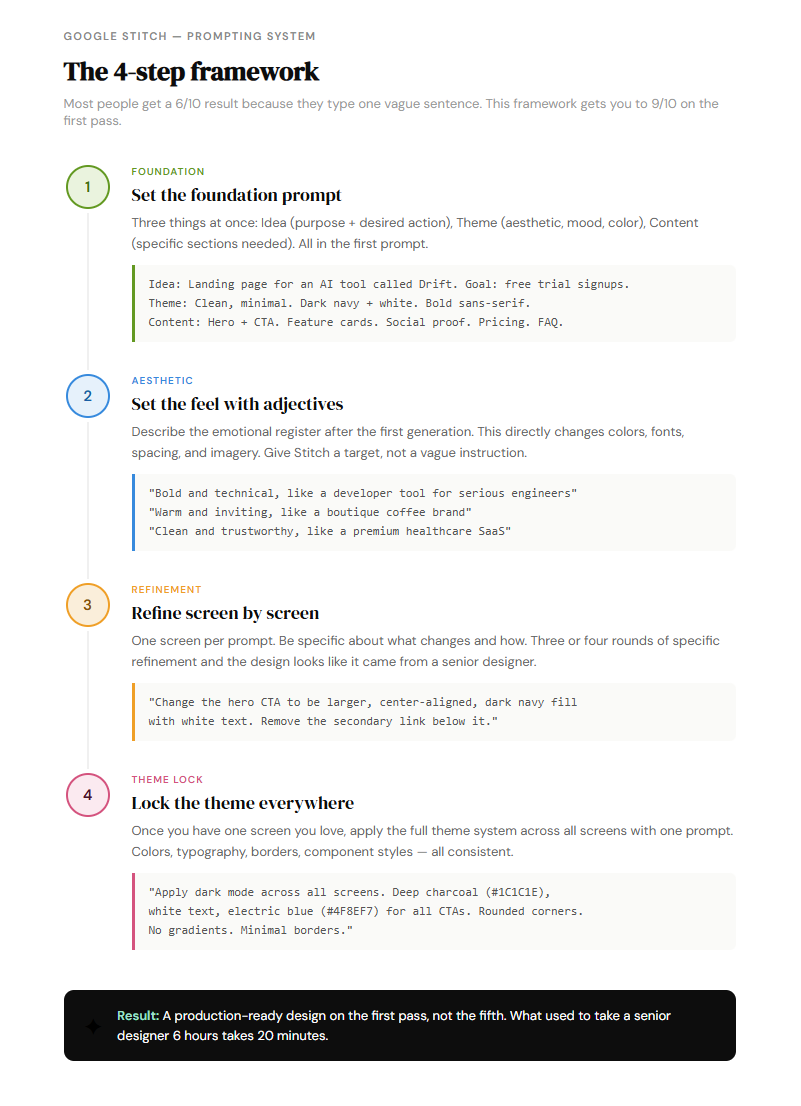
    Four-step diagram for prompting Google Stitch to generate high-fidelity UI designs. Step 1: Foundation prompt with Idea, Theme, and Content. Step 2: Set the aesthetic feel with adjectives. Step 3: Refine screen by screen with specific instructions. Step 4: Lock the theme across all screens with a single prompt.
    The 4-step Stitch prompting framework. Most people get a 6/10 result because they type one vague sentence. This structure produces a production-ready design on the first pass.
  2. 12 copy-paste prompts — landing pages, pitch decks, dashboards, mobile apps, SaaS products, e-commerce. Run them right now.

  3. The 5 hidden Stitch features — voice canvas, instant prototypes, brand kit import, DESIGN.md, and the Agent Manager. Every tutorial skips these.

  4. Stitch vs Figma: the real breakdown — when Stitch wins, when Figma still wins, and the exact workflow that uses both

  5. The MCP integration guide — how to connect Stitch to Claude Code and Cursor so designs flow directly into your code pipeline without switching tools

  6. 3 workflows worth stealing — pitch decks in 25 minutes, landing pages same day as the brief, and the variation pressure test that gets client alignment in one session

A freelance designer charges $2,000-5,000 for a landing page.

This guide takes 20 minutes and costs nothing.


Get instant access to this issue, every resource ever published in The AI Corner, and everything we ship going forward.

Start your free 7-day trial

Cancel anytime. First subscribers get 50% off, forever.


The Ultimate Stitch Guide

Step 1: The foundation prompt

Keep reading with a 7-day free trial

Subscribe to The AI Corner to keep reading this post and get 7 days of free access to the full post archives.

Already a paid subscriber? Sign in
© 2026 The AI Corner · Privacy ∙ Terms ∙ Collection notice
Start your SubstackGet the app
Substack is the home for great culture