

Something shifted in 2026.
The AI conversation stopped being about chatbots and started being about agents. Every serious founder I know is either building one, using one, or about to fall behind someone who is.
Here’s why the shift matters:
A chatbot answers a question. An agent does a job.
You ask ChatGPT to draft an email. That’s a chatbot. An agent reads your inbox, identifies which leads need follow-up, drafts personalized replies based on your past tone, logs everything in your CRM, and flags anything that needs your actual attention.
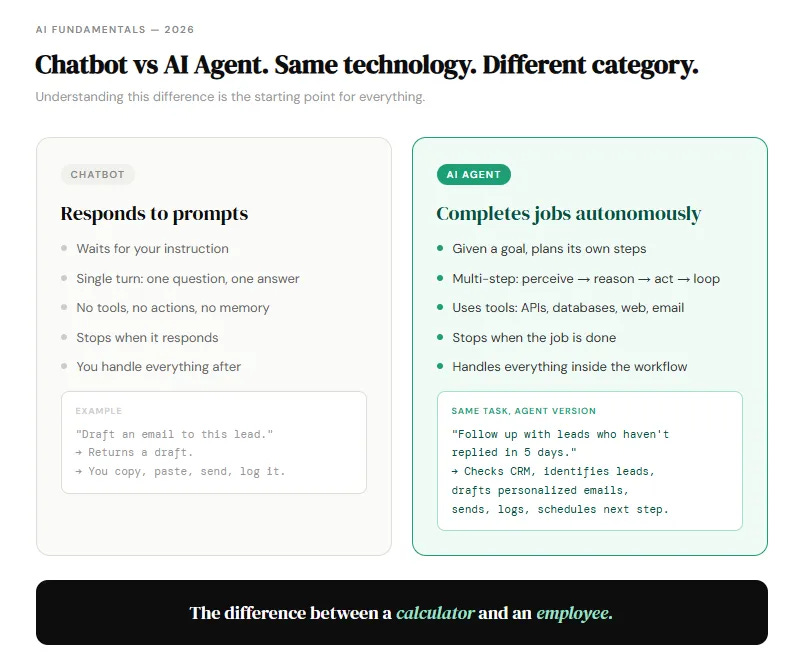
Same underlying technology. Completely different category of output.
The difference between a chatbot and an AI agent is the difference between a calculator and an employee.
The numbers are hard to ignore
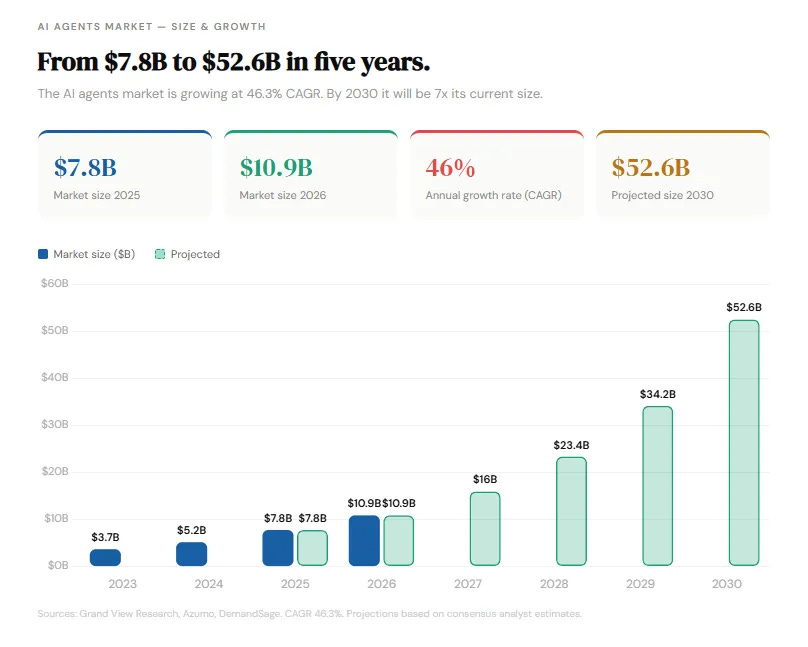
The global agentic AI market surged past $9 billion in 2026. Gartner projects 40% of enterprise applications will embed task-specific AI agents by year-end, up from under 5% in 2025.
Enterprise AI agent deployments are returning an average 171% ROI. US enterprises are seeing 192%. Those figures exceed traditional automation ROI by a factor of three, according to Deloitte’s 2026 State of AI in the Enterprise report.
By 2027, AI agents are projected to automate 15-50% of business processes. Businesses already using them report 55% higher operational efficiency and 35% cost reductions.
That is not hype. That is money companies are measuring and reporting.
What an AI agent actually is
Four components. Every agent, every use case.
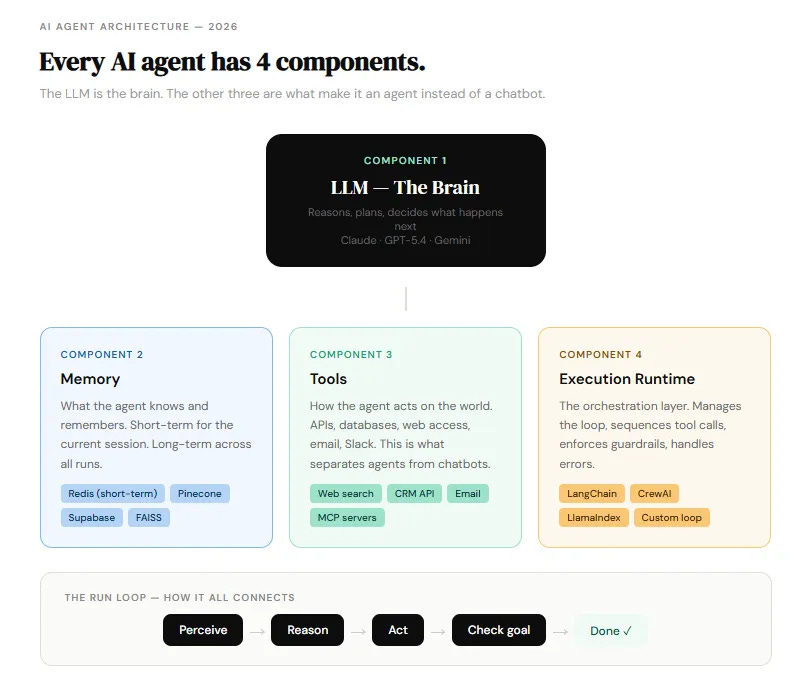
The LLM is the brain. It reasons, plans, and decides what happens next. Claude Sonnet 4.6, GPT-5.4 mini, Gemini 2.5 Flash — these are the models doing the thinking.
Memory is what the agent knows and remembers. Short-term memory handles the current session. Long-term memory (a vector database or SQL store) persists across runs so the agent gets smarter over time.
Tools are what turn a chatbot into an agent. APIs, web search, databases, file systems, email, Slack. Tools are how the agent acts instead of just responds.
The run loop is the engine. It runs until the goal is reached or a stop condition fires:
while not done and steps < limit:
    observe → reason → act → check
That loop is the whole game. Everything else is configuration.
The most important thing nobody tells you
If a task takes five minutes and you do it once a week, you probably do not need an agent. Save your energy for workflows that are high-frequency, repeatable, and could be taught to an intern.
Most people try to automate the wrong things first. They build complex agents for one-off tasks and then wonder why the ROI isn’t there.
The best first agent is the workflow you already do manually every single day. The one that’s slightly boring, completely repetitive, and takes longer than it should.
That’s the one to build.
Where to start (without coding anything)
Three paths. Pick based on where you are right now.
No-code (n8n, Dify, Langflow, Lindy): building an agent takes 15 to 60 minutes on most no-code platforms today. Business users, not just engineers, are creating agents. Start here if you want to understand what agents do before writing code.
Framework-based (LangChain, CrewAI, OpenAI Agents SDK): full control, requires Python, takes a day to ship something real. Start here if you’re technical and want production-grade outputs.
Custom from scratch: for teams with specific security or compliance requirements. Highest control, highest time investment.
The universal rule: ship one workflow. Make it reliable. Then expand.
According to Anthropic, the most successful agent deployments use simple, composable patterns. Start simple. Scale later.
The free part ends here. The good part starts now.
I’ve built this into a complete playbook. The free section gives you the mental model and the starting point.
What’s behind the paywall is the actual build guide.
Here’s exactly what you get:
The 8-step build framework — from purpose definition to production deployment, with decision points at every stage and the exact questions to answer before writing a line of code
The model selection guide — which model to use for which task, with real cost comparisons across Claude Opus 4.6, GPT-5.4, Gemini, and open-source options. Includes the routing strategy that cuts costs by 60-70%.
The complete tool stack — the exact frameworks, databases, and orchestration layers worth using in 2026, with honest tradeoffs and price points
6 copy-paste system prompts — for research agents, customer support triage, CRM enrichment, content pipelines, financial analysis, and coding agents. All ready to run.
The cost calculator — real math on what it costs to run an agent at 100, 1,000, and 10,000 runs per month so you know before you build
3 complete workflow blueprints — step-by-step builds with exact code for a research assistant agent, a CRM enrichment agent, and a content pipeline agent
The 5 most common failure modes — the exact things that kill production agents and how to prevent each one before it costs you
The no-code vs code decision tree — one question at a time, based on your use case, team, and timeline
This is the guide I wish existed when I started building agents. Every lesson is from production, not theory.
This guide alone is worth the subscription.
But you also get every single issue ever published in The AI Corner. Every tool breakdown, every workflow, every prompt library, every model release explained.
All of it, immediately.
Cancel anytime. No questions asked. First subscribers get 50% off forever.
Step 1: Define the job before touching anything else
Most agents fail here. Before the build. In the scoping.
3 questions to answer first: