


Hey, I’m Shubham Saboo, a Senior AI Product Manager at Google, creator of Awesome LLM Apps, a GitHub repository with 130,000+ stars, and Executive-in-Residence at Product Faculty – creator of the #1 AI Builder Fellowship, where you get access to six live cohorts led by frontier AI operators from OpenAI, Anthropic, Google, and more for less than $10 a day. Yes, really.
By the time you finish reading, you’ll understand how real AI loops work and have what you need to build your first one.

Don’t just read it. Open your editor, follow along, and build.
Most people still use AI one prompt at a time.

You ask ChatGPT to draft a customer email. It gives you something that sounds vaguely like a press release, so you tell it to be less formal. The second version sounds better but promises a feature your team has not committed to building. You correct that. The third version gets the facts right but misses what the customer asked.
By the fourth attempt, the reply is finally good enough to send.
It feels like the AI completed the task. The model produced the words. You handled the judgment. You noticed what failed, carried that lesson into the next attempt, enforced the rules, and decided when the work was finished.
Without calling them this, you performed four separate jobs:
You judged the output (evaluation).
You remembered what had failed (memory).
You enforced the boundaries (guardrails).
You decided when the answer was ready (stopping condition).
You were running a loop manually, inside your head.
Loop engineering takes that process out of your head and builds it into a system.
You define how the system should evaluate its work, what it should remember between attempts, which boundaries it cannot cross, and when it must stop or ask for help. The system can then tell whether its work is improving instead of waiting for you to supervise every response.

Why one prompt eventually stops working
A strong prompt can produce an impressive result. For a one-off task, that may be enough.
Real work has a quality bar, happens at volume, and needs to stay consistent long after your attention starts to drift.
Imagine an AI system responsible for answering customer feature requests. “Write a helpful response” sounds reasonable. But a usable response may need to:
Acknowledge the customer’s specific request
Describe the feature’s status accurately
Avoid inventing a delivery date
Match the company’s tone
Stay under 120 words
Give the customer an honest next step
A single prompt might satisfy all six requirements once. Maintaining that standard across 300 requests requires a system around the prompt.
At ten requests, you read carefully. At request fifty, you start scanning. By request two hundred, the model still generates at the same speed, but your quality control does not.
AI can evaluate the fiftieth item with the same energy as the first. That patience comes without earned judgment. The model does not know which failure matters, which boundary can never be crossed, or when another attempt is wasting money.
Treat a loop like a new employee with infinite patience and no earned judgment.
You would not hire someone on Monday, tell them to “handle customer requests,” give them access to every system, and disappear. You would explain the outcome, show them examples, define what they could change, specify which decisions needed approval, review their early work, and make it clear when the task was complete.
A reliable AI loop needs the same things.
How prompts, workflows, agents, and loops differ

Suppose a customer asks whether a Salesforce integration is coming.
A prompt drafts one reply. If the reply is weak, nothing happens unless a human notices.
A workflow retrieves the account, checks the roadmap, drafts a response, and routes it for approval in a sequence designed beforehand.
An agent receives an objective and tools. It may decide to inspect the CRM, search the roadmap, read a related product discussion, and ask for clarification when the sources conflict.
A loop evaluates the resulting reply against a defined standard. If the answer fails to acknowledge the customer’s six-month wait, that failure becomes input to the next attempt. If every check passes, the system stops and requests approval. If the evidence conflicts, it escalates.
The architecture becomes:
Act → observe → evaluate → update state → decide → repeat, stop, or escalate
In simplified pseudocode:
while target_not_reached:
result = take_action(context, memory)
evaluation = evaluate(result, rubric)
log(result, evaluation)
if evaluation.passes:
stop_with_success(result)
if human_decision_required(evaluation):
escalate(result, evaluation)
if budget_exhausted() or progress_stalled():
stop_without_success()
memory = update_memory(result, evaluation)
The while statement is the easy part. Loop engineering lives in the decisions around it: what counts as passing, what belongs in memory, which actions require approval, and how the system knows progress has stalled.
Running the same prompt ten times amounts to rerolling the output and hoping for a better result. A loop learns something from each round and uses that information to decide what happens next.
The 9 parts of a reliable loop
I maintain a large open-source repository and receive roughly 15 to 20 pull requests on a typical day.
My agent reviews them each morning, runs relevant checks, and prepares recommendations.
It does not merge or reject anything on its own. I make the consequential decision.
That workflow exposes all nine parts of a dependable loop.

1. Goal
“Review today’s pull requests” describes an activity without defining when the review is complete.
A measurable goal would be: inspect every changed file, run the required tests, link failures to evidence, identify security-sensitive changes, and produce a recommendation of approve, request changes, or escalate.
2. Context
The agent may need the repository architecture, contribution guidelines, coding conventions, security policies, test commands, known constraints, and examples of accepted changes.
Context should be relevant and current. Dumping three years of issues and conversations into one window usually adds noise. A practical loop begins with a small set of repository-wide rules, then retrieves component-specific material when needed.
3. Actions
Actions are the moves the loop may make: inspect a diff, search the repository, run an approved test, draft a review comment, or revise a recommendation.
Keep actions narrow enough to trace. “Manage the pull request” is too broad to debug or control.
4. Tools
Tools give the model the ability to perform those actions: read-only GitHub access, repository search, a sandboxed shell, a test runner, and documentation retrieval.
Tool access should match the job. A loop that only inspects pull requests does not need permission to merge them.
5. Evals
The evaluator checks whether every changed file was inspected, required tests ran, failures include logs, comments cite specific evidence, and sensitive changes were recognized.
Use code for deterministic checks. Use source comparisons for factual checks. Reserve model judgment for requirements that genuinely need interpretation.
“Rate this review from 1 to 10” gives the next round almost nothing to work with. “auth/session.py changed but was not inspected” tells it exactly what to fix.
6. Memory
The loop needs structured state: files inspected, tests executed, results, failed evaluations, previous recommendations, and unresolved questions.
Memory should not be an endlessly growing transcript. A concise state object is usually more useful:
Pull request: #1842
Files changed: 7
Files inspected: 6
Missing inspection: auth/session.py
Tests run: unit, integration
Failed checks: 1
Risk level: high
Required next action: inspect permission changes
7. Guardrails
The loop may never merge or close a pull request, execute untrusted code outside its sandbox, expose secrets, change production infrastructure, or publish comments without approval.
Enforce important boundaries through the architecture as well as the prompt. A system that must never merge code should not hold merge permission.
8. Escalation
The loop should raise its hand when a change affects authentication, tests produce conflicting results, documentation is unclear, or the decision depends on product intent.
A good escalation includes the conflict, the evidence, and the decision required. “I’m not sure” leaves the human to reconstruct the entire case.
9. Stopping condition
The loop can stop because the review passes, the round or cost limit is reached, progress stalls, a tool fails, or a human decision is required.
“Stop when the review is perfect” leaves the loop without a usable threshold. Production loops need explicit exits for success, budget, stall, escalation, and failure.
The model handles generation and reasoning. The system around it supplies the controls.
Let’s build your first real AI loop
A company has a prompt for answering customer feature requests. It works six or seven times out of ten. Some replies are generic. Others imply that uncommitted features are coming.
We want to improve the underlying prompt until it performs consistently across many different requests.
This is a Self-Improving Champion Loop.

The existing prompt is the champion. Every proposed change is a challenger. A challenger takes the title only if it proves that it is better.
Step 1: Build the dataset
Start with 40 real requests drawn from production, including the ambiguity, frustration, and unusual wording the system will face after launch.
25 requests form the improvement set
15 requests form the holdout set
The loop uses the improvement set to find failures and develop changes. It does not study the holdout cases while proposing them.
The holdout shows whether the prompt learned a general lesson or only got better at the practice cases.
Step 2: Define the evaluator
Every response receives one point for each check:
It restates the customer’s specific request.
It describes the feature’s status truthfully.
It avoids promising work outside the committed roadmap.
It follows the company’s tone rules.
It stays under 120 words.
Each reply scores zero to five. The final score is the average across the evaluated cases.
Whenever a requirement can be made concrete, make it concrete. Word count can be checked with code. Roadmap claims can be compared with an approved source. Tone may need model judgment, but even tone can be divided into specific rules.
If the evaluator is vague, the loop will optimize toward a vague target.
Step 3: Establish the champion
Run the existing prompt against all 15 holdout cases without changing it.
The baseline scores 3.4 out of 5, and ten of the 15 replies fail the overpromising check.
Now we know where the system is weak, and the current prompt holds the title until something beats it.
Step 4: Run controlled experiments
Every round follows the same process:
1. Review the champion’s current failures.
2. Propose exactly one prompt change.
3. Test the challenger on the improvement set.
4. Reject it if that result becomes worse.
5. Test promising challengers on the holdout set.
6. Promote only if the challenger beats the champion.
7. Keep the champion in the event of a tie.
8. Log the change, scores, failures, cost, and decision.
One change per round preserves causality. If the challenger alters five things and improves, we do not know what helped or what quietly made the result worse.
Step 5: Define the stop before running
This loop stops when:
Target: The holdout average reaches 4.5
Budget: The loop completes 12 rounds
Stall: Three consecutive rounds produce no promotion
A production version should also include explicit time, token, and dollar limits.
What happened
Adding three examples raised performance on the improvement cases by almost half a point. It looked like the best change so far.
Then it faced the holdout and scored 3.6 against the champion’s 3.8.
The examples encouraged the prompt to imitate the practice cases. It got better at familiar requests and worse at unfamiliar ones. The challenger was rejected.
Without the holdout, the team would have shipped a worse prompt while holding a higher development score as proof of progress.
Round four produced the largest useful jump. The loop added a direct rule:
If the requested feature is not on the committed roadmap, say that the team is tracking demand. Do not provide an estimated delivery date.
That change attacked the most frequent baseline failure and moved the score from 4.0 to 4.4.
Rounds five and six were rejected. That is normal. If every challenger wins, question the evaluator before celebrating the model.
Round seven reached 4.6. The target was 4.5, so the loop stopped by itself.
The run took about 40 minutes of unattended time and cost roughly $2. The final prompt was 30% different from the original. Every change was logged and had to defeat the active champion before entering the final version.

Controlled self-improvement follows a plain sequence:
Propose → test → compare → promote or reject → log → repeat
For a small experiment, the improvement-and-holdout split is enough. A long-running production system should add a third, untouched audit set. Repeatedly testing against the same holdout can eventually leak information through the scores, even if the loop never sees the individual cases.
Three more loop architectures worth stealing
The same building blocks support several other loop patterns.

1. The Saturation Loop
Give the system 60 interviews, 300 tickets, and a batch of survey responses. It processes them in batches of 20, extracts pain points, clusters them, and attaches an original quote and source to every cluster.
After each batch, it asks whether the evidence created a new cluster, materially changed an existing one, or merely added weight to what was already known.
The loop stops after two consecutive batches reveal nothing new, with a hard cap of ten batches.
Its evaluator is research saturation. Its memory is the evolving map of clusters, quotes, sources, and processed batches.
Before using the results, a human clicks through a few important clusters. If a claim cannot be traced back to a customer’s actual words, it does not enter the roadmap deck.
2. The Builder-Critic Loop
One model builds a PRD. Another has one job, which is to argue that it is wrong.
The critic attacks assumptions, edge cases, success metrics, operational costs, and irreversible decisions. It does not rewrite the document. The builder cannot silently dismiss an objection.
Every objection ends as either:
Fixed: The document changes
Accepted: The risk remains, but the reason is recorded
The loop stops when no high-impact objection remains or when the critic begins repeating objections already resolved.
I ran a pricing PRD through this pattern. The critic raised 11 objections. Seven produced changes. Four were accepted deliberately, with the reasoning preserved for future stakeholder discussions.
For higher-stakes work, different models can play the two roles. Separating creation from opposition reduces the chance that the same blind spot controls both.
3. The Product Experience Loop
The agent opens the product in a fresh browser session and attempts a real task: create an account, set up a project, invite a teammate, or connect a data source.
It captures every screen and scores the journey against a rubric: Is the next action obvious? Does the error explain what failed? Can the user recover? Is the loading state visible? Does the page meet the performance threshold?
The loop selects the weakest screen, applies one change, restarts with a fresh session, and performs the entire task again. It evaluates the completed journey rather than one component in isolation.
It stops when the journey reaches the target score or two complete passes produce no improvement.
Changes to pricing, legal terms, privacy language, or permissions halt the loop and require approval. The agent may clarify an empty state. It does not get to redefine what the customer is buying.
In one run, the loop found an error message that said only “Invalid input.” It changed the message to name the field, explain the required format, and show the user how to fix it. That screen moved from two to four on the rubric.
Even an airline refund can become a loop. Every reply creates a new deadline. The system records it, follows up when it expires, and carries the claim number, correspondence, and policy into the next action. It stops when the refund arrives or a legal or human decision is genuinely required.
These criteria also fit deadlines and follow-ups, which means loops can handle plenty of operational work outside product and engineering.
If you want to master frontier AI skills and become AI native builder & operator companies are desperately looking to hire, then there’s nothing better than Product Faculty’s AI builder fellowship:

The AI Builder Fellowship gives you unlimited access to every LIVE certification (Not recorded videos) they run (6 at the moment) for an entire year, taught by some of the people building AI at the frontier, including OpenAI Product Manager (Rohan Varma), Google Senior AI Product Manager (Shubham Saboo), and executive leaders from many of the world’s leading AI companies, including but not limited to:
• AI Product Management (LIVE)
• AI Product Strategy (LIVE)
• Agentic Engineering (LIVE)
• AI Product Leadership (LIVE)
• AI-Native PM with Claude (LIVE)
• Advanced Product Management - on demand
• Plus every new certification we launch while you’re an active Fellow.
Purchased separately, these programs are worth $19,245+.
Their lowest-priced certification alone starts at $2,700+.
Instead of paying for each program individually, you can join the entire AI Builder Fellowship for just $3,450/yr (soon pricing will be $5,000/yr) with my code…
If you’re serious about becoming an AI-native builder, there’s no better place to start.
The five ways loops fail
A loop can complete every round without crashing and still become less useful.

1. Drift
The Champion Loop once learned that shorter replies passed more checks. By round nine, the answers were brief, polite, safe, and almost useless.
The system had optimized the proxy instead of the outcome.
Fix it by restating the actual objective every round, using a multidimensional rubric, and inspecting the direction of behavior rather than the score alone.
2. Weak evals
If the judge is easier to fool than the task is to perform, the loop will learn to please the judge.
Use deterministic checks where possible, require evidence for model judgments, test the evaluator on known pass and fail cases, and audit samples manually.
3. Runaway cost
One request becomes many cases, rounds, generations, and evaluation passes. Rejected challengers still cost money.
Define maximum rounds, runtime, tokens, calls, and dollar spend before execution. Use smaller models or code for simpler checks and reserve expensive reasoning for ambiguous cases.
4. Latency
Some loops take 40 minutes or several hours. Watching them removes much of the benefit.
Run them asynchronously, record structured checkpoints, make runs resumable, and notify humans only on completion, failure, or escalation.
5. Endless retries
“Continue until perfect” creates an endless loop when perfection is unreachable.
Pair every quality target with a budget and stall rule. A stalled loop should preserve its best result, explain the unresolved failure, and ask for the missing human decision.
Many loop failures come from an incomplete specification: a weak goal, a gameable evaluator, a missing budget, or an unreachable stop condition. Fixing those problems rarely requires a smarter model.
A loop that works only while someone watches its terminal is still a prototype.
What should become a loop?
Not every task needs one. If a one-off generation works reliably, adding state, evals, logs, and retries may create more complexity than value.
Ask three questions:
Can the result be checked?
A coding loop can run tests. A research loop can check for saturation. A customer-response loop can verify claims against the roadmap. A PRD loop can track unresolved objections.
If you cannot explain how you would judge the result yourself, clarify what good work looks like before automating it.
What happens if the system is wrong?
An internal summary and a customer refund carry different consequences. Anything involving customers, money, legal commitments, private data, permissions, or irreversible changes needs a stronger human gate.
Automate what is checkable. Escalate what is consequential.
Can you define the stop before starting?
Write down success, budget, stall, escalation, and failure before pressing run. “We will see how it goes” works during an experiment but gives an unattended system no operating policy.
Let the loop earn autonomy
A loop should move through four stages:
Shadow: It runs on real work but cannot affect anything. Compare what it would have done with the human decision.
Suggest: It presents recommendations. Record whether humans accept, edit, reject, or escalate them.
Approve: It prepares the real action, but a human must inspect the evidence and approve execution.
Bounded autonomy: It acts independently only inside a narrow, documented boundary.

“The agent can handle support” leaves too much undefined. A usable boundary sounds more like this: “The system may send replies for these six low-risk request types, using these approved sources, when all seven checks pass, within this daily cost and volume limit.”
Grant autonomy based on observable evidence rather than the model’s stated confidence. Required tests passed. Sources were retrieved. Claims match approved records. The case belongs to a known category. No escalation trigger is present.
Even then, sample the autonomous decisions. A tool change, new input format, or policy update can invalidate last month’s performance.
The one-page Loop Specification
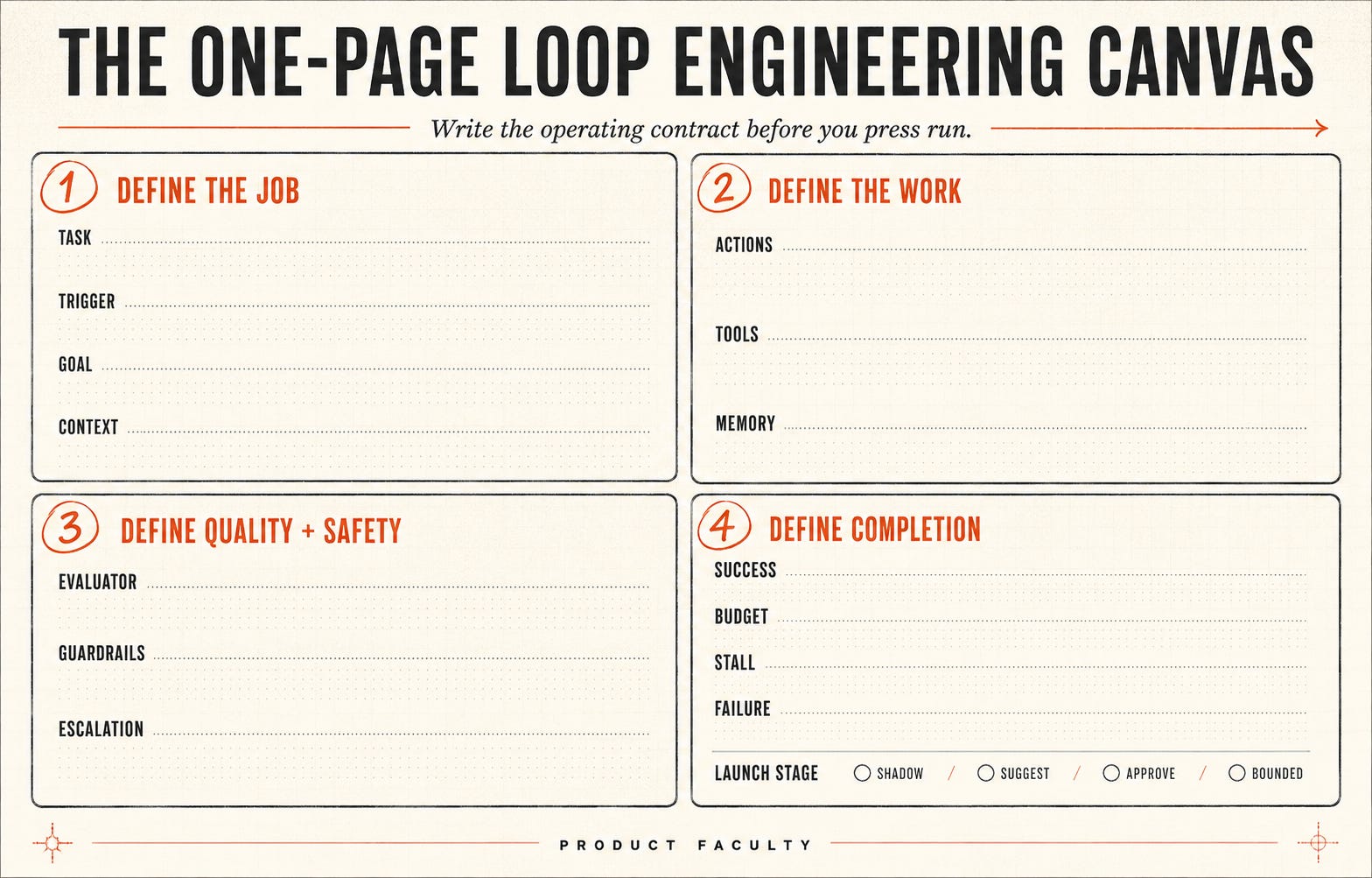
Choose one narrow task you performed at least three times this month. Then fill this in before building:
TASK
What repeatable job will the loop perform?
TRIGGER
What event or schedule starts it?
GOAL
What measurable state means success?
CONTEXT
What current documents, examples, rules, and history does it need?
ACTIONS
What small moves may it make during a round?
TOOLS
What systems can it access, with which permissions?
EVALUATOR
How will each result be judged?
Which checks use code, source comparison, a model, or a human?
MEMORY
What structured state must carry between rounds?
GUARDRAILS
What must it never do?
ESCALATION
Which conditions require a human, and what evidence should it present?
STOPPING CONDITIONS
Success:
Budget:
Stall:
Escalation:
Failure:
LOG
What inputs, actions, evidence, scores, costs, changes, and decisions
must be recorded?
LAUNCH STAGE
[ ] Shadow
[ ] Suggest
[ ] Human approval required
[ ] Bounded autonomy
If you cannot fill in one of these fields, do not hide the uncertainty inside a longer prompt. The blank shows which part of the system still needs design work.
Copyable Self-Improving Champion Loop template
This template can improve prompts, reports, classifications, customer replies, and other artifacts that can be evaluated repeatedly. Replace every bracketed field.
ROLE
You operate a controlled improvement loop.
Improve the current champion while protecting against overfitting,
uncontrolled changes, unnecessary cost, and unsupported claims of progress.
OBJECTIVE
Improve [ARTIFACT OR PROMPT] until it reaches [TARGET SCORE] on
[DEFINED RUBRIC].
The current version remains champion until a challenger defeats it
under the promotion rules below.
INPUTS
1. Current champion: [CURRENT VERSION]
2. Improvement set: [DEVELOPMENT CASES]
3. Validation set: [COMPARISON CASES]
4. Evaluation rubric: [CONCRETE CHECKS]
5. Allowed changes: [WHAT MAY CHANGE]
6. Prohibited changes: [WHAT MAY NEVER CHANGE]
7. Budget:
- Maximum rounds: [NUMBER]
- Maximum runtime: [TIME]
- Maximum cost: [AMOUNT]
- Maximum rounds without promotion: [NUMBER]
BASELINE
1. Run the current champion on the validation set.
2. Evaluate every output in a separate pass.
3. Record the score by rubric criterion and overall average.
4. Identify the most frequent failure categories.
5. Save this result as the baseline.
6. Do not modify the champion during the baseline.
EACH ROUND
1. Review the champion’s current failures.
2. Select one failure to address.
3. Propose exactly one change and explain why it should help.
4. Create a challenger containing only that change.
5. Run it on the improvement set and evaluate it.
6. Reject it if performance becomes worse.
7. If promising, run it on the validation set in a separate pass.
8. Compare it with the current champion.
9. Promote or reject it using the rules below.
10. Append the complete result to the log.
PROMOTION RULES
Promote only when:
- The validation score is higher than the champion’s.
- No critical criterion becomes worse.
- No guardrail is violated.
- The improvement is supported by recorded evidence.
- The run remains within budget.
A tie goes to the champion.
STOPPING CONDITIONS
Stop with success when the target is reached and all critical checks pass.
Stop without success when:
- The maximum rounds complete.
- The stall limit is reached.
- The time, token, or cost budget is exhausted.
- A required tool or dataset is unavailable.
- Further progress requires human judgment.
- The evaluator becomes inconsistent.
When stopping without success, preserve the best champion and explain
the unresolved failure.
LOG EACH ROUND
- Round number
- Active champion and score
- Failure selected
- Proposed change and reason
- Improvement and validation scores
- Score by criterion
- Regressions
- Cost and runtime
- Promotion decision and reason
FINAL OUTPUT
Return:
1. Final champion
2. Baseline and final scores
3. Complete promotion history
4. Rejected challengers
5. Remaining failures
6. Total cost and runtime
7. Reason the loop stopped
8. Cases requiring human review
Do not describe the final version as improved unless the recorded validation results support that conclusion.
A prompt cannot create missing permissions, trustworthy data, or test infrastructure. This template is the operating contract. You still need to give the system the tools and evidence required to honor it.
What’s Next? Start with one boring loop
Skip “an autonomous agent that runs product management.” Choose the recurring job that annoys you every week, preferably one where you have already corrected the same failure several times.
Your first loop should show you where your judgment currently lives. Each rejected output, remembered mistake, enforced boundary, and stopping decision reveals another rule that belongs in the system.
Write those rules down. Run the loop in shadow mode. Read its logs, inspect its mistakes, and strengthen the evaluator before you give it more authority.
Fascinating perspective Loop Engineering could be the key to building AI systems that continuously learn, adapt and improve.
The holdout result in round two is the most useful failure in the whole piece. A challenger that gains half a point on the improvement set and then loses ground on unseen cases is not an improvement, it is memorization dressed up as progress. Most teams I see building agent evaluation pipelines skip that split entirely and end up shipping a prompt that scores well on the exact examples someone wrote the eval against, which is a different thing from working.
The four stage autonomy ladder, shadow, suggest, approve, bounded autonomy, is the part I would push people to write down before they touch a model. Granting autonomy based on observable evidence rather than the model's stated confidence is a distinction that gets lost the moment a demo goes well. A system that passed its tests once in shadow mode is not the same system six weeks later once the input distribution has shifted, and the piece is right that sampling autonomous decisions has to be ongoing, not a one time gate.
What I would add from the enterprise side is that the evaluator itself is usually the weakest link, and it is rarely audited with the same rigor as the loop it is judging. A vague rubric produces a system that is very good at satisfying a vague rubric, which looks like progress on a dashboard and means nothing in production. Happy to connect, let's talk more about it.